
What you see when you sign in
What your dashboard tells you, what each menu item is for, and where to start.
Overview
Signing in takes you to your dashboard. The panel at the top tells you where your membership stands — that is the short answer to "what is happening with my membership".
What you see depends on your membership. Someone waiting for a decision sees progress. A member sees their dates and shortcuts. Someone due to renew sees a reminder.
Your account and your membership are two different things. Your account is how you sign in. Your membership is what we hold about you. You can have an account and not be a member yet — that is what a new signup is.
Menu items appear when they apply to you. Nothing is hidden — you simply do not see sections you cannot use.
Reference
| Home | Your dashboard. Where your membership stands, your dates, what has happened recently, upcoming events. |
|---|---|
| My Profile | Your details and your password. Your membership card opens from here. |
| Events | What is coming up, and one click to say you are going. You need to be a member. |
| My Referrals | Everyone you have brought in, and the form to invite someone. |
| Receipts | Every payment you have made, as a PDF you can download. |
| Help | This guide. It has its own search. |
Step-by-step
-
Read the panel at the top firstIt tells you where your membership stands, your dates, and the one thing to do if there is one.
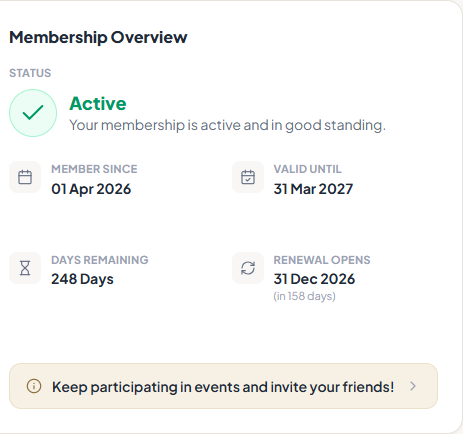
The panel at the top of your dashboard. -
Do what it asks, if it asks anythingComplete your registration takes you to the form. Payment Due carries the payment link — the same one we emailed, so you do not have to find the email.
-
Check Recent Activity before asking us anythingIt lists everything that has happened to your membership, with dates. It usually answers "did that go through?" on its own.
-
Set up two things onceThe button in the top bar switches between light and dark. The sidebar can shrink to just icons. Both are per device, so they do not follow you to your phone.Press Ctrl + K (or ⌘ K) anywhere to search. It finds pages and your own records.
Tips
Notes
Troubleshooting
Your dashboard says Complete your registration.
Why it happens: You have an account but have not sent in an application. They are two separate steps.
What to do: Follow that link. The form goes in all at once, so allow a couple of minutes and have your address to hand.
Your menu is shorter than someone else’s.
Why it happens: You see the sections that apply to you. Committee members see more.
What to do: Nothing to fix. If something you genuinely need is missing, check your status on your dashboard, then ask us.
You sign in and are immediately signed out.
Why it happens: Your browser is blocking cookies — usually private browsing.
What to do: Use a normal window, or allow cookies for this site, then sign in again.
A panel you expected is not there.
Why it happens: Panels appear when they apply. A renewal reminder only shows when you can renew, and events only when there are some.
What to do: Check the panel at the top to see where you stand. A missing panel usually means it does not apply to you.