
Your membership card
How to open your card, save it for offline use, and check that someone else’s card is genuine.
Overview
You get a card once you are a member. Open it from My Profile — it opens over the page, sized for a phone.
It shows your photo, your name, your Member ID, your membership type and the date it is valid until. All of it comes from your record, so if you correct your name or change your photo, the card shows it next time you open it.
Download it as a PDF to keep on your phone. That copy works with no signal and no signing in, which is what you want at an event.
The QR code is the useful part. Anyone can scan it to check the card is genuine — it opens a page on our portal that confirms it. A photo of a card proves nothing; a scan does.
If you are the one checking, look at the web address after you scan. A page that looks right on the wrong website means nothing.
Reference
| When you get it | When you become a member. There is no card before you have paid. |
|---|---|
| After renewing | Your Member ID and card number stay the same. Only the valid-until date changes. |
| What a scan shows | Your name, your Member ID, and whether your membership is valid now. |
| What it does not show | Your address, phone number, email or payments. |
| If your membership has run out | The page says so, honestly. That is not a fault. |
Step-by-step
-
Open it from your profileMy Profile has the card. It opens over the page, so you do not lose your place.
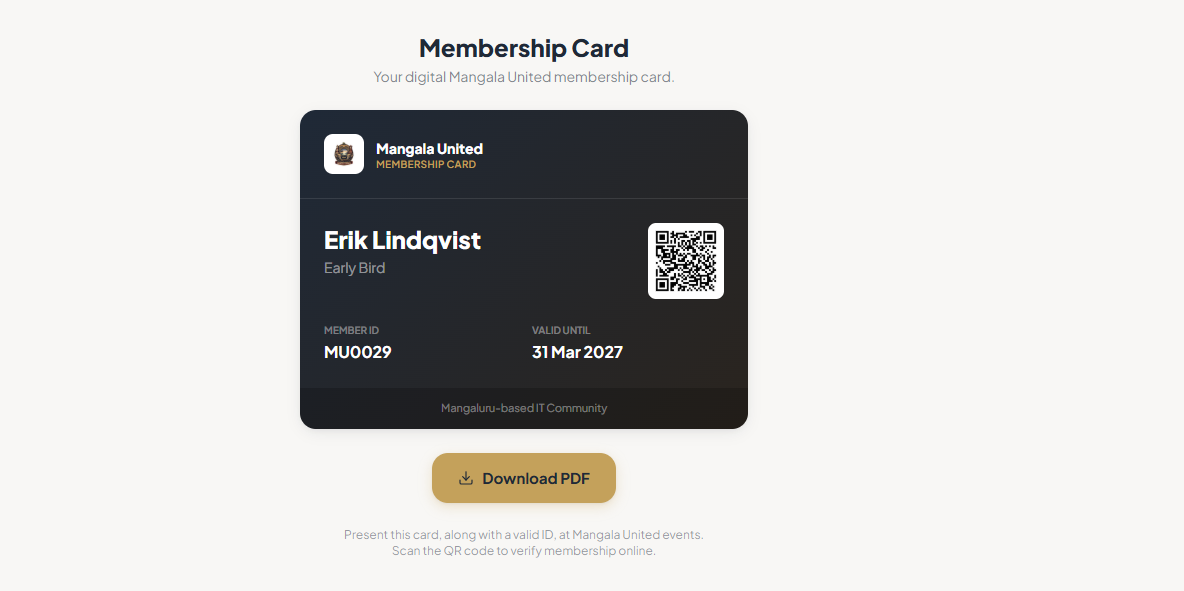
Your membership card. -
Check the three things that come from your recordYour name, your photo and the valid-until date. If any of them is wrong, fix your profile and open the card again.
-
Download the PDF to keep on your phoneIt works without signal or signing in. Download it again after you renew — an old copy still shows the old date.
-
To check someone’s card, scan it and look at the web addressThe QR code opens our verification page and confirms the membership. Scanning is the easy part. Checking that the address really is our portal is the part that proves anything.
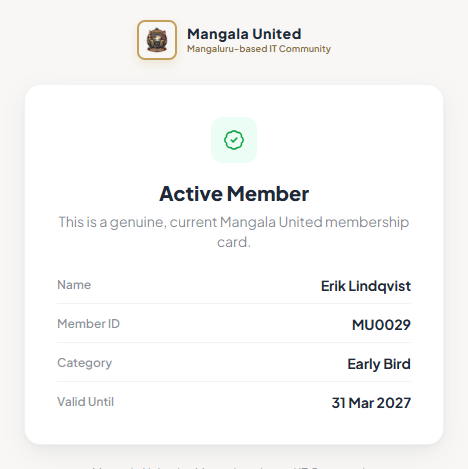
The page you get when you scan a card. -
If you print it, print at full sizeNo shrinking. The code has to stay square and sharp to scan.
Tips
Notes
Troubleshooting
You have no card.
Why it happens: Cards come with membership, so there is none before your payment goes through.
What to do: Check your status on your dashboard. The card appears once you are Active.
The name or photo on it is wrong.
Why it happens: The card shows whatever is on your record.
What to do: Fix it in My Profile, then open the card again. If the field is locked, ask us.
The saved PDF shows an old date.
Why it happens: A downloaded copy keeps the date it was made with.
What to do: Download it again.
A scan says the membership is not active.
Why it happens: The membership has run out or been closed.
What to do: If that is wrong, check your dashboard first, then ask us.