
Events and notifications
How to say you are coming to an event, and what the bell in the top bar is telling you.
Overview
Events shows what is coming up and what has already happened. To say you are coming, press RSVP. To change your mind, press it again.
You need to be a member to RSVP. The organisers use the numbers to order food and check people in, so telling them you cannot come is genuinely more useful than just not turning up.
An RSVP is not a ticket. It does not hold a place unless the event says places are limited.
The bell in the top bar shows two things together: announcements to members, and things that have happened to your own membership. The red dot means something new has arrived.
Opening the bell clears the dot for everything in it. Nothing is ever deleted — View all shows the full history.
Reference
| To RSVP | You need to be a current member. Applicants can see events but not the button. |
|---|---|
| What is in the bell | Announcements to members, and changes to your own membership. Many of them link to the right page. |
| Some announcements | Are only shown to current members. |
| The bell | Shows the newest 8. |
| View all | Up to 100, newest first, marking what was new since you last looked. |
| The red dot | One dot for everything. Opening the bell or the full page clears it. Messages are not marked read one by one. |
| What we also email you | Anything you need to act on or keep: password resets, decisions on your application, payment and renewal links, receipts. These cannot be turned off. |
Step-by-step
-
RSVP from Events or from your dashboardThe row changes to Going straight away. There is no confirmation step. Press Going again to withdraw.Add it to your own calendar too. We keep the list but do not send calendar invitations.
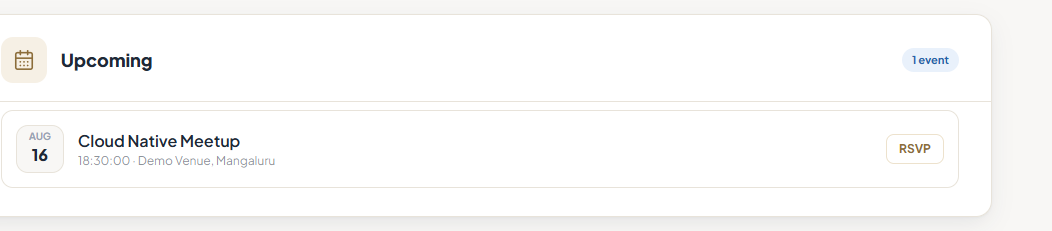
An event before and after saying you are going. -
Withdraw as soon as you know you cannot comeLate is fine. The numbers are what food and seating are ordered against, so an accurate no is worth more than an optimistic yes.
-
Open the bell to clear the dotNewest first, each with a date. Many of them are links — a payment message opens Receipts, an approval opens your card.
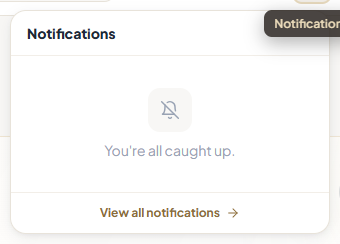
The notification bell. -
Use View all to go further backThe bell shows the newest 8. View all shows up to 100 and marks what was new since your last visit. That is where to look for a date you need to quote.
Tips
Notes
Troubleshooting
There is no RSVP button.
Why it happens: You need a current membership to RSVP.
What to do: Check your status on your dashboard.
You pressed RSVP and nothing changed.
Why it happens: The request did not go through, usually a dropped connection.
What to do: Reload the page and check before pressing again.
The red dot keeps coming back.
Why it happens: New things really are arriving. A payment and an activation arrive as two separate entries.
What to do: Open the bell and read from the top. Nothing is lost by leaving it.
You want to re-read something and it is not in the bell.
Why it happens: The bell only shows the newest 8.
What to do: Use View all. Nothing is ever deleted.
You never get any email from us.
Why it happens: We have the wrong address, or your email provider is filtering us.
What to do: Check the address in My Profile and mark us as safe. If the address is wrong and you cannot sign in to fix it, ask us.